What is EXIF Data? A Complete Beginner's Guide (2025)
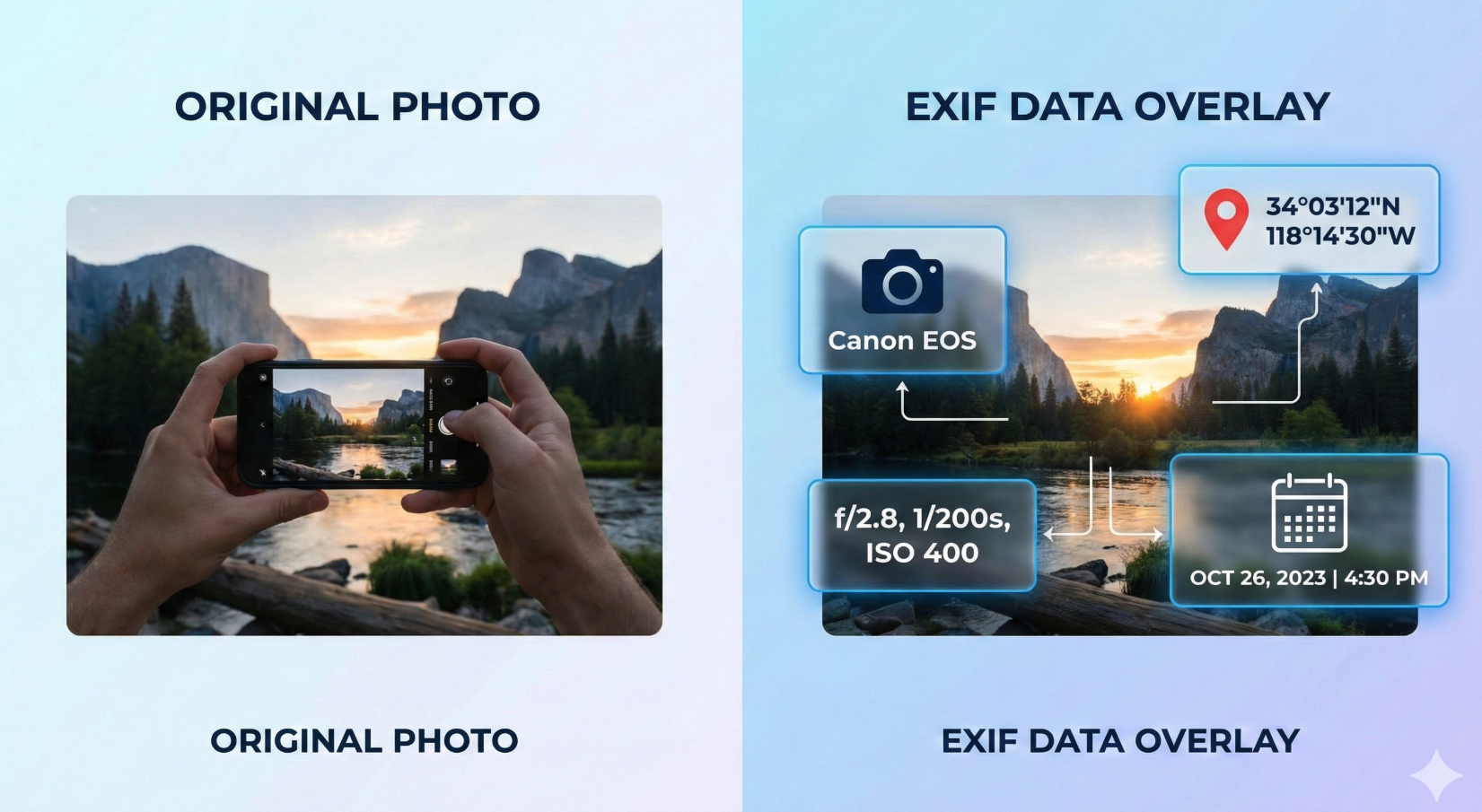
Every photo you take with your smartphone or camera contains hidden information beyond the image itself. This hidden data is called EXIF data – and it can reveal everything from your camera settings to your exact GPS location.
Whether you're a photography enthusiast wanting to learn from your shots, or someone concerned about privacy when sharing photos online, understanding EXIF data is essential.
In this guide, you'll learn:
- What EXIF data is and what it contains
- Why it matters for photography and privacy
- How to view and remove it from your photos
Let's uncover what's hiding in your photos.
What is EXIF Data?
EXIF stands for Exchangeable Image File Format. It's a standard way of storing metadata (information about information) in digital photographs.
Every time you take a photo, your camera or smartphone automatically records technical details about how that photo was created and embeds this information invisibly within the image file.
Think of it like a birth certificate for your photo – recording when, where, and how it was created.
💡 Quick Tip: EXIF data doesn't change what you see in the photo. It's completely invisible when viewing the image normally, but it's there in the file, waiting to be read.
What Information Does EXIF Contain?

EXIF data can include dozens of different pieces of information:
Camera & Equipment
- Camera make and model (e.g., "iPhone 14 Pro" or "Canon EOS R5")
- Lens information and focal length
- Camera serial number
Camera Settings
- Shutter speed (e.g., 1/250 second)
- Aperture (e.g., f/2.8)
- ISO (e.g., 400)
- Flash information
- White balance
- Exposure compensation
Date & Time
- Exact date and time the photo was taken
- When the file was last modified
- Timezone information
GPS Location Data
- Latitude and longitude (exact coordinates)
- Altitude
- Direction camera was facing
🔒 Privacy Note: If GPS is enabled on your phone, every photo contains your exact location – potentially revealing your home address or current whereabouts. Learn how to remove metadata from your photos before sharing them online.
File Information
- Image dimensions and resolution
- File size
- Color space
- Compression type
Optional Metadata
- Copyright information
- Photographer name
- Keywords and captions
- Software used for editing
Why EXIF Data Matters
Benefits for Photography and Organization
For Learning Photography:
- Learn what settings created great shots
- Troubleshoot problems (why a photo is blurry, overexposed, etc.)
- Study other photographers' techniques
- Track your progress over time
Example: Your portrait has beautiful background blur. Checking EXIF reveals: f/1.8 aperture, 85mm focal length. Now you know how to recreate that effect!
For Photo Management:
- Sort photos by date automatically
- Find images by camera or lens
- Create photo maps of your travels
- Search thousands of photos instantly
Privacy Considerations
EXIF data can expose:
- Your home address (from photos taken at home)
- Your daily patterns and routines
- When you're away on vacation
- Your device information
Real-World Example: In 2012, tech entrepreneur John McAfee was hiding in Guatemala. A journalist posted a photo with him online. The EXIF data contained GPS coordinates revealing his exact location. He was arrested within 48 hours.
Important: Anyone who downloads your photo can extract EXIF data using free tools – it's not encrypted or protected in any way.
How to View EXIF Data
On Windows
- Right-click the image → Properties
- Click the Details tab
- Scroll through all the metadata
On Mac
- Open photo in Preview
- Press Cmd + I
- Click the "i" icon and select tabs (General, GPS, etc.)
Alternatively, use the Photos app: Open image → Click "i" button
On iPhone
- Open photo in Photos app
- Swipe up or tap the "i" button
- View basic info (date, location map)
Note: For detailed camera settings, you'll need a third-party app like "Photo Investigator" or "Exif Viewer by Fluntro"
On Android
- Open photo in Gallery or Google Photos
- Tap More (⋮) → Details
- View EXIF information
Using Online Tools
The easiest way to view complete EXIF data is using ExifTools online viewer. Simply upload your photo to see:
- All camera settings and technical data
- GPS coordinates displayed on an interactive map
- Date, time, and file information
- Complete metadata analysis
Benefits:
- ✅ No software installation required
- ✅ Works on any device (phone, tablet, computer)
- ✅ Shows all EXIF fields
- ✅ Privacy-focused (files auto-deleted within 24 hours)
How to Remove EXIF Data
When Should You Remove EXIF?
Consider removing EXIF before sharing photos that show:
- Your home or regular locations
- Your children at school or playgrounds
- Real-time vacation photos
- Anything posted to public forums or marketplaces
Quick Removal Methods
Online (Fastest & Easiest Method):
Use the ExifTools Metadata Remover to quickly strip metadata:
- Upload your photo(s)
- Click "Remove Metadata"
- Download the cleaned version
- Share safely without location data
Benefits:
- ✅ Instant metadata removal
- ✅ Batch processing for multiple photos
- ✅ No software installation needed
- ✅ Works on any device
- ✅ Preserves image quality
Windows:
- Right-click → Properties → Details
- Click "Remove Properties and Personal Information"
- Choose "Create a copy with all possible properties removed"
Mac:
- Download ImageOptim (free app)
- Drag photos onto the app
- EXIF is automatically removed
iPhone/Android: Popular apps include:
- Metapho (iOS)
- EXIF Eraser (Android)
- Photo Metadata Remover (both platforms)
Preventing GPS Tracking
Stop location data from being added in the first place:
iPhone:
Settings → Privacy & Security → Location Services → Camera
→ Select "Never"
Android:
Camera app → Settings → Location tags or Geotagging
→ Toggle OFF
Do Social Media Sites Remove EXIF?
Most major platforms automatically strip EXIF data:
Remove EXIF: Facebook, Instagram, Twitter/X, Reddit, WhatsApp, TikTok
Keep EXIF: Flickr, 500px (designed for photographers)
Varies: Email attachments, cloud storage, smaller websites
Best Practice: Don't rely solely on platforms to protect you. Use the metadata remover yourself before uploading, especially if photos contain GPS data from your home or other private locations.
Common Questions About EXIF Data
Can EXIF data be edited or faked?
Yes. EXIF can be modified using various software tools, so it shouldn't be considered definitive proof of when or where a photo was taken.
Does removing EXIF affect image quality?
No. EXIF is separate from the image pixels. Removing metadata doesn't change the visual quality of your photo.
Do all photos have EXIF data?
Most digital photos do, but there are exceptions: screenshots, GIF images, and photos downloaded from social media platforms that strip metadata.
How much storage space does EXIF use?
Very little – typically 10-50 KB. Removing it has minimal impact on file size.
Can I recover EXIF after it's been removed?
No. Once removed from a file, it's permanently gone (unless you have the original file backed up elsewhere).
Is EXIF data the same as IPTC or XMP?
No. EXIF is camera-generated technical data. IPTC is user-added descriptive data (captions, keywords). XMP is Adobe's metadata format. All three can exist in the same photo.
Best Practices for Managing EXIF Data
For Privacy Protection
- Check before sharing: Use ExifTools to review what EXIF data your photos contain before posting online
- Disable GPS for sensitive photos: Turn off location services when photographing private locations
- Remove metadata proactively: Use the metadata remover before sharing photos publicly
- Create sharing copies: Keep original files with full EXIF in your backup, share cleaned copies online
For Photography Learning
- Study your successes: Review EXIF from your best shots to understand what worked
- Analyze mistakes: Check settings on failed photos to identify problems
- Keep a reference: Note successful settings for different scenarios
- Compare over time: Track how your technique improves by comparing old and new EXIF data
For Photo Organization
- Use metadata for sorting: Organize by date, camera, or location
- Add copyright info: Include your name and copyright in EXIF for professional work
- Maintain backups: Store originals with complete EXIF data
- Use photo management software: Tools like Lightroom or Apple Photos leverage EXIF for organization
Conclusion
EXIF data serves as both a valuable learning tool and a potential privacy concern. Understanding what information your photos contain empowers you to make informed decisions about when to preserve metadata and when to remove it.
Key Takeaways:
- Every digital photo contains hidden metadata about camera settings, date/time, and potentially GPS location
- EXIF data helps photographers learn their craft and organize photo libraries
- GPS coordinates in EXIF can reveal your exact location to anyone who downloads your photo
- Free tools exist for viewing, editing, and removing EXIF data on all platforms
- You can enjoy the benefits of EXIF while protecting privacy by managing metadata appropriately
The most important step is awareness. Now that you understand EXIF data, you can check what your photos contain and make conscious choices about what information to share.
