Content Credentials Explained: Verify a C2PA Signature
Content Credentials (C2PA) are a signed record of how a photo, video, audio file or PDF was made. Here's what they contain, how to check that the signature holds and the file hasn't changed since, and what "verified" does and doesn't mean.
Content Credentials are a signed record, attached to a file, that says how it was made: captured by a camera, edited in an app or generated by AI, by whom and when. To verify them, you check three things: that the signature is intact, that the file hasn't changed since it was signed, and that the signer is on a trusted list. A free Content Credentials checker does all three with the official C2PA tools and shows the result in plain words.
The idea behind it is simple. Instead of guessing where a picture came from, the camera or app that made it signs a statement about it, and anyone can check that statement later. Adobe, OpenAI, Google, Microsoft, Leica, Sony and others already add Content Credentials, so you'll meet them more and more often in news photos, stock images and AI pictures.
What's inside Content Credentials
The technical name is C2PA, after the Coalition for Content Provenance and Authenticity that writes the standard. The record itself is called a manifest, and it's stored inside the file. A typical one holds:
- The signer: the company or person whose certificate signed the record, and when.
- How the content was made: camera capture, captured then edited, generative AI, partly generative AI, a screenshot, digital art and so on.
- What was done to it: a numbered list of actions such as "Created", "Opened", "Colour adjusted" or "Cropped", with the app that did each one.
- What it was made from: the earlier files (called ingredients) that went into it, each with its own credentials or none.
- Optional extras: a title, the creator's name, and whether the creator allows the content to be used for AI training.
Because all of this is signed, a change to the record or to the image after signing is detectable. That's the whole point, and it's also why verification matters: an unchecked record is just a claim.
How to verify Content Credentials
- Use the file you want to check, exactly as you received it. Credentials live inside the file, so a screenshot or a copy re-saved by a social network usually has none left.
- Open the Content Credentials checker and drop the file in. It accepts photos, videos, audio files, PDFs and Word, Excel and PowerPoint documents.
- Read the verdict at the top. It's one line: "Verified: signed by…", "Changed after it was signed", and so on. The sentence under it explains what that means for this copy.
- Read the summary. It shows who signed, when, the signer's standing, any AI disclosure and how the content was made.
- Look at the checks, the actions and "Made from" if you need the detail. Every check is listed in plain words with its official code underneath, and the full manifest is one click away.
Here's an image generated with Adobe Firefly:
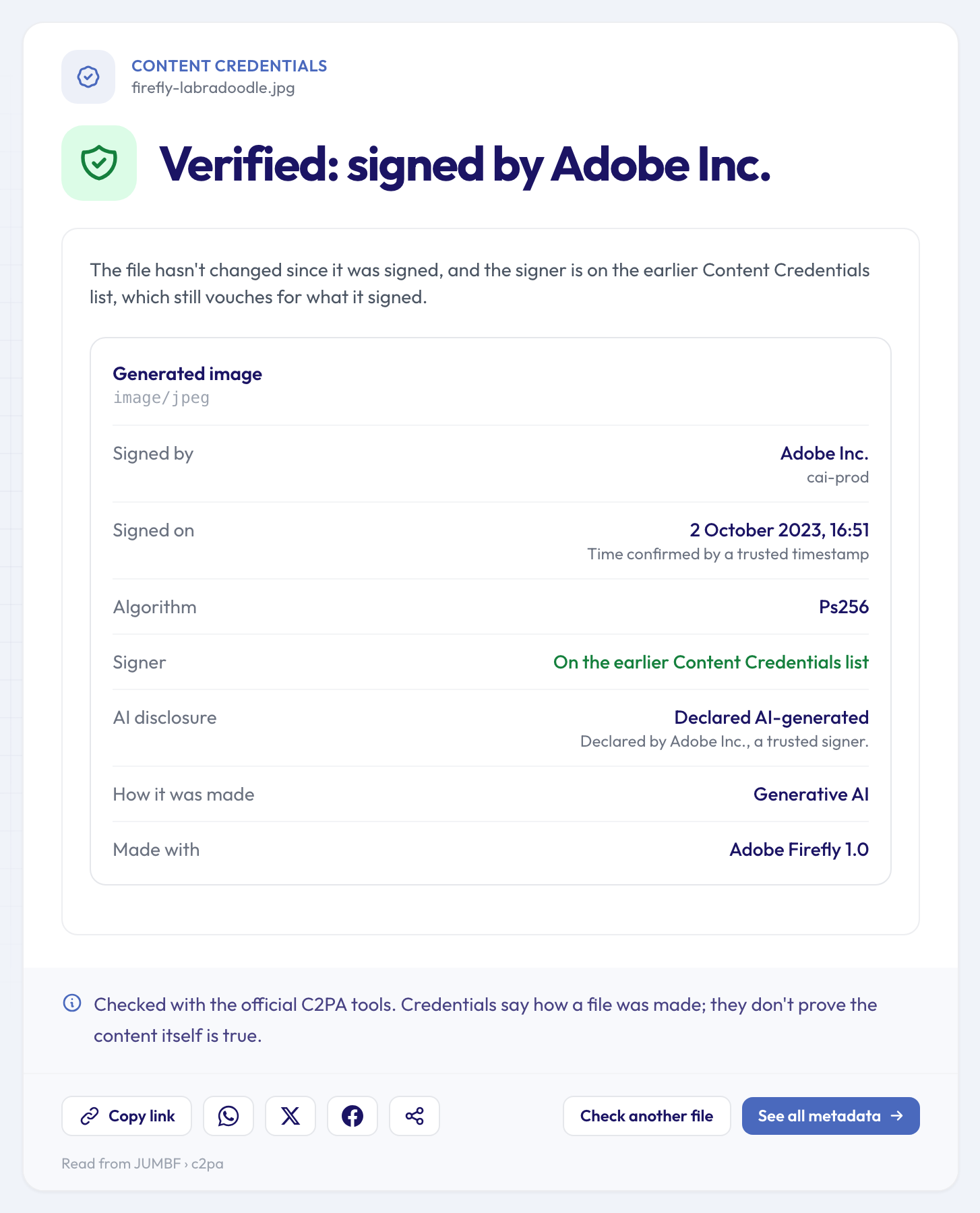 Unchanged since signing, signed by a listed signer, and openly declared as generative AI.
The signature holds, the image hasn't changed since Adobe signed it, and the timestamp was confirmed by a trusted timestamp authority. Note what the record says too: "Declared AI-generated". Verified credentials are just as useful for showing that something is AI as for showing that it isn't. Other formats work the same way: a PDF exported from Adobe Express with Content Credentials also comes back "Verified: signed by Adobe Inc."
What each result means
The verdict always answers one question: can you rely on this record for this copy of the file?
- Verified: signed by… The file hasn't changed since it was signed, and the signer's certificate is on the C2PA Trust List. Some older files show that the signer is on "the earlier Content Credentials list": that list was closed to new entries at the start of 2026 but still vouches for what its members signed, so it's labelled separately rather than hidden.
- Signed by…, who we can't confirm. The signature is intact and the file is unchanged, but the certificate isn't on any trusted list. Anyone can create a certificate with any name in it, so treat the name as a claim, not a fact.
- Changed after it was signed. Someone edited the file after the record was made, so the record no longer describes this copy. That's not automatically sinister: re-saving in an app that doesn't update credentials does the same. But the credentials can't vouch for what you're looking at.
- These credentials don't check out. The signature is broken or doesn't match the record. Don't rely on anything it says.
- The signature can't be confirmed. The signing certificate has expired and no trusted timestamp shows it was valid at the time of signing.
- Credentials stored online. The file only points to a record kept on a website. The checker doesn't fetch it, so nothing was checked.
- Signed by…, but not confirmed unchanged. For Word, Excel, PowerPoint, OpenDocument and EPUB files, the official tools can check the signature but can't yet confirm the document is unchanged, and the result says so.
Here's what an edit after signing looks like. The record was made for a file called CA.jpg; the copy we checked had been changed since:
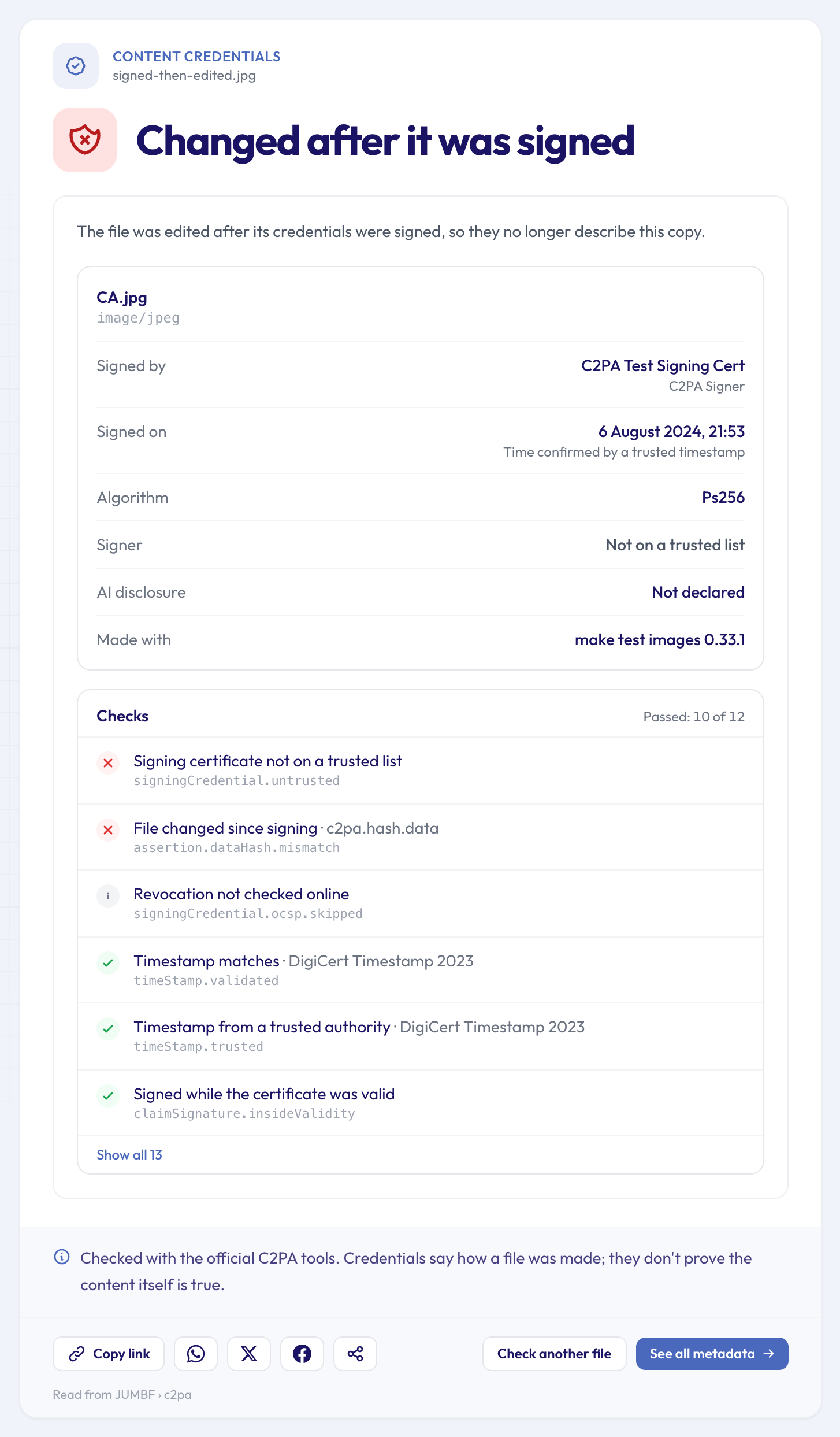 The failed check "File changed since signing" is the one that matters. This test certificate isn't on a trusted list either.
And here's a file whose signature is fine but whose signer can't be confirmed:
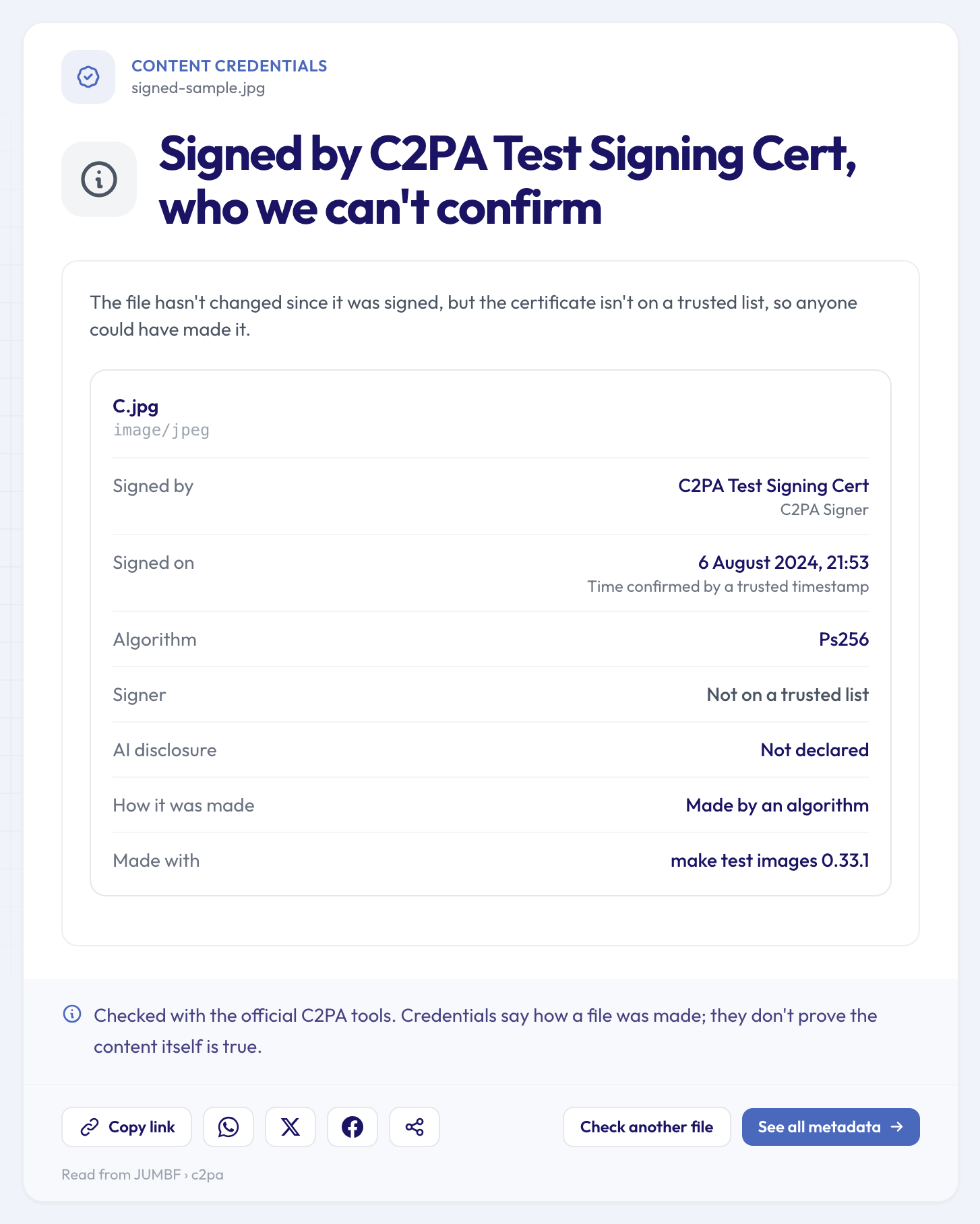 Intact and unchanged, but signed with a certificate no trusted list vouches for.
A few limits are worth knowing. The check runs offline: it doesn't go online to see whether a certificate was revoked after the fact, and the report notes "Revocation not checked online" rather than pretending otherwise. Thumbnails stored inside the credentials aren't shown. And a file without any Content Credentials gets a plain "not found": most files don't have them yet, and that says nothing about whether the file is genuine.
What "verified" doesn't mean
This is the part most explanations skip. Verified Content Credentials tell you two things: who signed the record, and that the file hasn't changed since. They don't tell you:
- That the scene is true. A camera can sign a photo of a staged scene, or of a screen showing another picture.
- What happened before signing. The record covers what the signing app knew. If it was added late in the process, earlier steps may not be in it.
- Anything about files without credentials. Most genuine photos have none, because most cameras and phones don't add them yet, and screenshots, re-saving and social networks remove them.
Think of Content Credentials like a sealed envelope with a return address. A verified seal tells you the envelope wasn't opened and who sealed it. It doesn't vouch for the letter inside.
Where else you'll see the result
You don't need the dedicated tool to spot credentials. When you open any file in the full metadata viewer, the key information card shows the same verdict on one line, with a link to the full check, and the Full Metadata section gets its own Content Credentials panel:
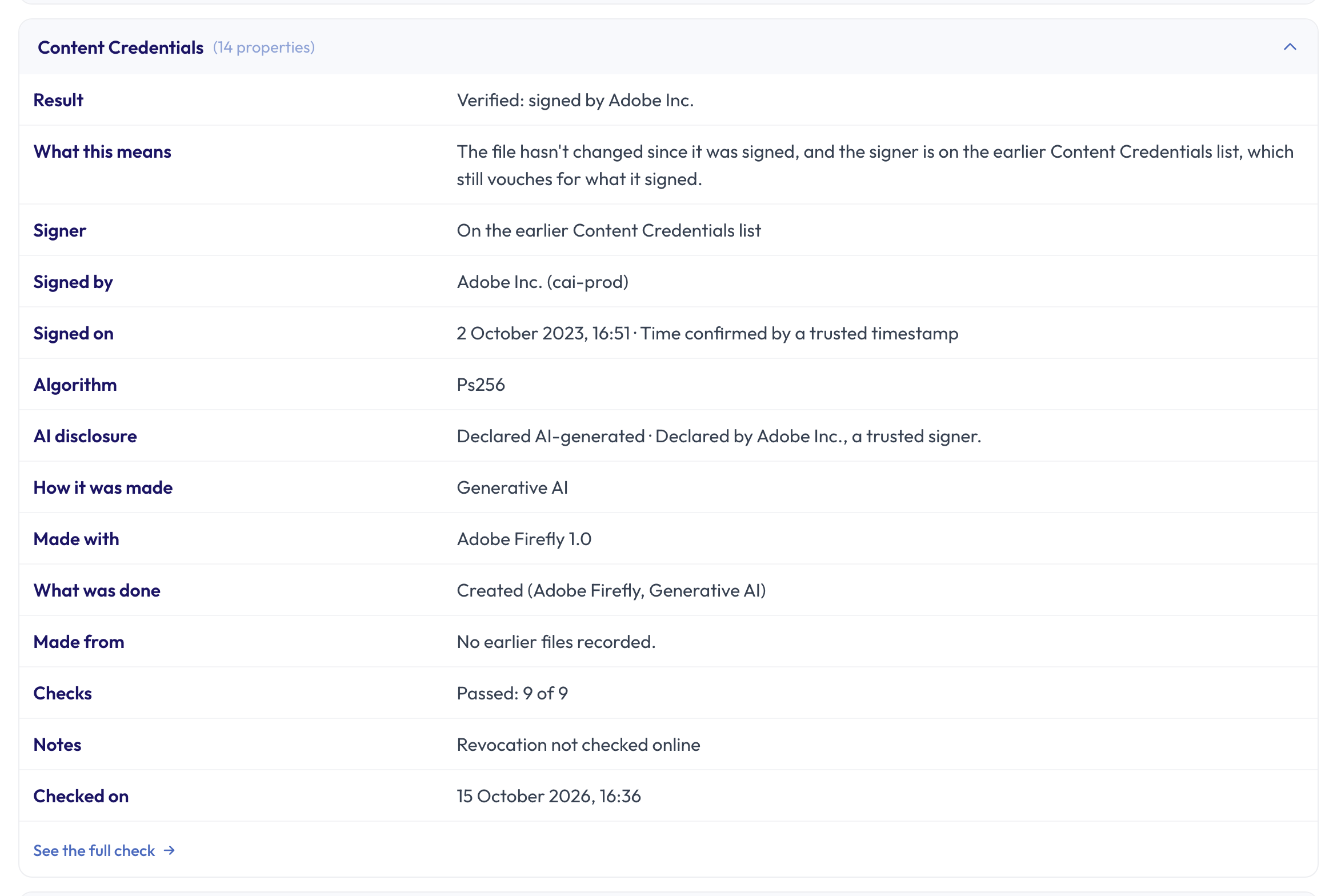 The panel sums up the check next to every other detail in the file.
Related checks
- If the record says "generative AI", or if a picture has no credentials at all, the AI image checker looks for every other label AI tools leave. Our guide to telling whether an image is AI-generated covers what those labels are worth.
- For a photo without credentials, the photo edit checker and the photo software finder look at the older, unsigned traces editing apps leave.
- AI images made with Stable Diffusion or ComfyUI rarely carry credentials but often keep their prompt: the AI image prompt reader shows it.
Questions people ask
Can Content Credentials be faked?
The record can be copied or written by anyone, but not signed in someone else's name without their private key. That's why the signer's standing matters: a verified result means the certificate is on a trusted list. A record signed with an unlisted certificate proves only that whoever made it had that certificate.
Why do my own photos have no Content Credentials?
Most cameras and phones don't add them yet. Some newer models do, in some cases only once the feature is switched on in the settings. Even then, editing, exporting or posting the photo can drop them unless every app along the way keeps them.
What's the difference between "Verified" and "Signed by…, who we can't confirm"?
Both mean the signature holds and the file is unchanged. The difference is the certificate: a verified signer is on the C2PA Trust List (or the earlier list), while an unconfirmed one isn't on any list, so its name can't be relied on.
Does removing metadata remove Content Credentials?
Yes. The credentials are stored with the file's other hidden details, so a metadata remover, a screenshot or a re-save in many apps deletes them. That's one reason a missing record proves nothing. If you publish AI images and want the records gone in bulk, our guide to stripping metadata from AI images with the API shows how.
Check a file's credentials
Got a photo, video or PDF that claims to carry Content Credentials? Drop it into the Content Credentials checker to see whether the signature holds, who signed it and whether the file has changed since. It's free and takes a few seconds.