How to Find Out Who Created a PDF
Most PDFs carry the name of the person or account that made them, plus the app and the dates. Here's how to read it in seconds, where that name comes from, and why it's a lead rather than proof.
Most PDFs carry a name inside them: the author, saved automatically by the app that made the file. To see it, drop the PDF into a PDF author finder and the name appears in a few seconds, along with the app that created the document and when it was created and last changed. That name usually comes from the computer or account that made the file, so it points you in the right direction, but it isn't proof of who wrote it.
It's a surprisingly useful thing to know. A letter or quote arrives without a signature and you want to know who prepared it. A CV is forwarded to you with the contact details removed. A colleague's template turns up with someone else's name in it. Or you're about to send a PDF of your own and want to know whose name is travelling with it.
How to see who created a PDF
- Use the file as you received it. Save the attachment or download it directly. Running it through "Print to PDF", an online compressor or a merger first can wipe the author, or replace it.
- Open the PDF Author Finder to see who created a PDF and drop the file onto the page, or tap to choose it. It works in any browser, on a phone too.
- Read the answer. The author name comes first. Under it you'll see "Created with" (the app the document was written in), "PDF made by" (the software that wrote the PDF), and the dates it was created and last changed.
- Want every field? "See all metadata" opens the same file in the full metadata viewer, which lists everything the PDF says about itself, including the title.
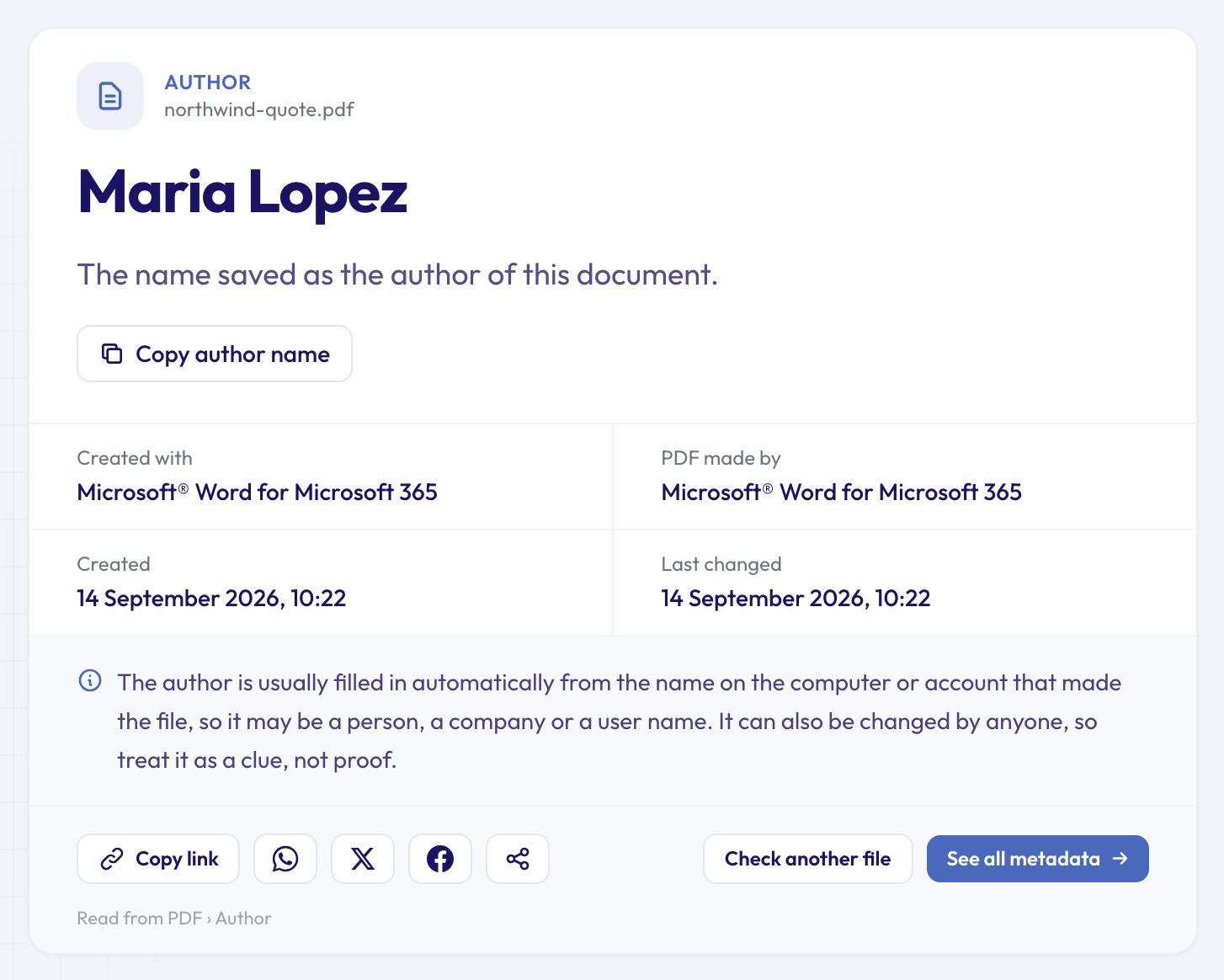 A quote exported from Word: the author's name, the app that made it, and the same date for "created" and "last changed".
The check is free and you don't need an account. The file goes over an encrypted connection, is read on our servers and is deleted automatically after about 24 hours. The answer stays on a results page with its own link, which you can share or keep to yourself.
Where the author name comes from
Every PDF can hold a small block of document information: a title, an author, a subject, keywords, the app that created the content, the software that produced the PDF, and two dates. Many PDFs also keep a second copy of these details in a format called XMP. The PDF Author Finder reads the author from the document information first and falls back to the XMP copy if that's empty.
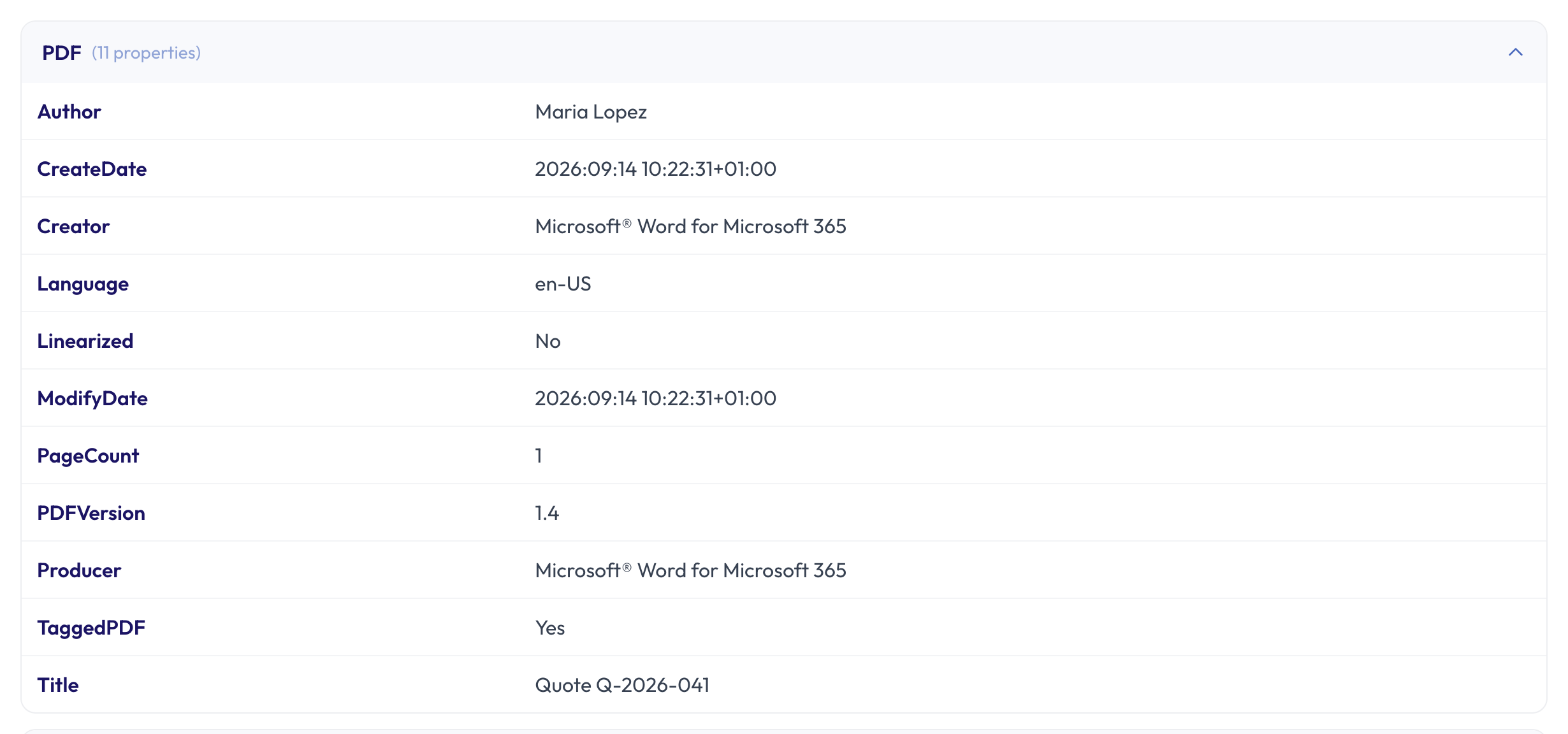 The same quote in the full metadata viewer: the author sits next to the title, the apps and the dates.
Nobody types the author in by hand, as a rule. It's filled in for them:
- Word, Excel and PowerPoint copy it from the document's own properties when you save as PDF, and those come from the name set in Office or on the computer. If the original Word file had an author, the PDF usually inherits it.
- Copies of older documents keep their author. If someone opens last year's proposal, changes the client name and saves it under a new name, the author is often still the person who wrote last year's version.
- Browsers ("Print", then "Save as PDF") usually leave the author empty.
- Scanners rarely save a person's name; you're more likely to see the scanner's model in the app fields.
- Business systems that generate invoices, tickets and statements often leave it empty or put in a company name.
You can see the same field without uploading anything, too: most PDF readers show it under Document Properties (in Chrome's PDF viewer, in the menu; in Preview on a Mac, under Tools, Show Inspector). The tool simply puts it next to the details that help you judge it.
How far can you trust the name?
Treat the author as a lead, not as evidence. It's whatever name was set on the machine or account that made the file, so it can be a real name ("Maria Lopez"), a user name ("mlopez"), a company, or a placeholder such as "Admin" or "Owner" on a computer nobody personalised. On a shared, second-hand or company laptop it can be the name of whoever set the computer up.
It can also be changed in seconds. PDF editors let anyone type a different author into the document properties, and some online converters replace it with their own details. A name that matches the person you expected is reassuring; a name that doesn't is a reason to ask, not a verdict.
Look at the other lines too. If the dates fit the story and the app makes sense (Word for a letter, an invoicing system for an invoice), the author is more believable. If the PDF was "created" in March and changed again last week, the PDF Date Checker shows when it was created and last changed, and the PDF Edit Checker looks for signs that a PDF was edited after it was made.
When there's no author in the file
Plenty of PDFs have no author at all. Here's a typical one, an order confirmation saved from a shop's web page with Chrome:
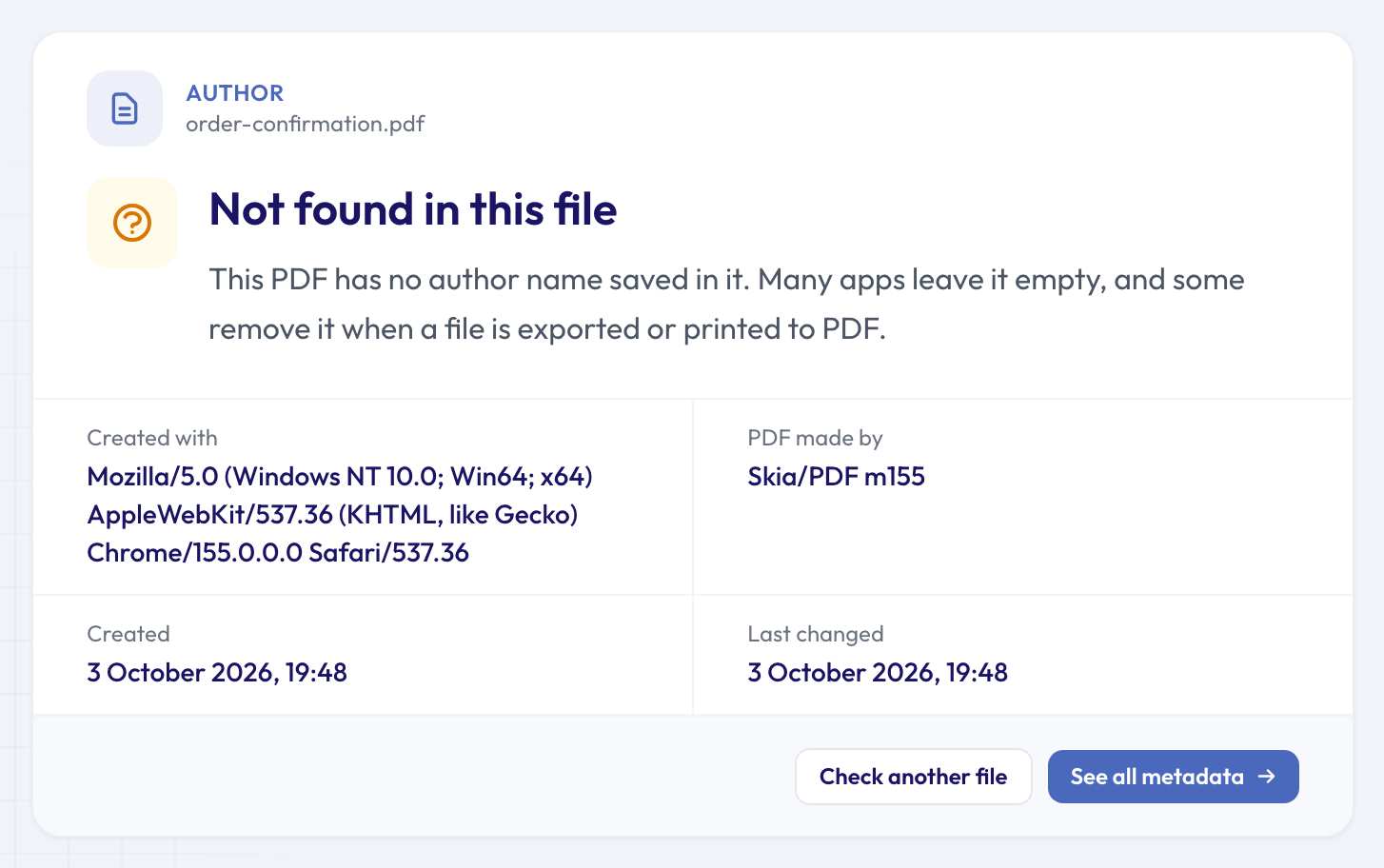 No author saved, but the PDF still says it was made by Chrome on Windows, on 3 October 2026 at 19:48.
Even then, the file isn't silent. "Created with" here is the browser's own description of itself (Chrome on a Windows PC), and "Skia/PDF" is the engine Chrome uses to write PDFs. The PDF Software Finder explains what made a PDF in plain words, which tells you whether it was typed in Word, saved from a browser, scanned, or produced by a company's system. Beyond the metadata, the best clues are usually in the document itself and in the email it came with.
If what you have is a Word, Excel or PowerPoint file rather than a PDF, the Document Author Finder shows who wrote an Office file and who saved it last. And if a PDF carries Content Credentials, a signed record of who made it (still rare for documents), the Content Credentials Checker verifies the signature; our guide to verifying Content Credentials explains what that signature does and doesn't prove.
Keeping your own name out of PDFs you send
The flip side: every PDF you export may carry your name, your company and the exact time you made it. That's fine for a report with your name on the cover. It's less fine for an anonymous survey response, a document you're passing on for someone else, or a file going to people you don't know.
Check one of your own PDFs with the author finder first. To strip the details, the metadata remover gives you back a clean copy: it removes the document information and the XMP copy, clears the names and dates on comments and highlights, and rewrites the file so older copies of those details aren't left inside it. In Word for Windows you can also untick "Document properties" in the PDF options (Save As, PDF, Options) before you export. Photos carry details of their own, location included; our guide to whether a photo reveals where you live shows how to check one before you send it.
For more checks like this one, the full list of free single-question tools covers photos, videos and documents; our overview of 50 free tools that answer one question about a file walks through them.
Questions people ask
Can I find out who made a PDF if the author field is empty?
Not from the author field. Look at the app, the dates and the content instead: a letterhead, an email address, a reference number. The sender is often the most reliable answer, and you can simply ask.
Is the author the person who sent me the PDF?
Not necessarily. The author is whoever's name was set when the file was made. Someone else may have forwarded it, edited it or exported it from a colleague's document.
Does the author change when someone edits a PDF?
Usually not. Editing apps tend to keep the author and update the "last changed" date and the software name instead, which is why those fields are worth comparing.
Why does the author say "Admin" or a company name?
Because that was the name set on the computer or account that made the file. Work laptops are often set up with a company or department name, and personal ones sometimes with a placeholder.
Do comments in a PDF show who wrote them?
Usually, yes. Comments, sticky notes and highlights store their own author name, separately from the document's author. The finder shows the document's author; the metadata remover clears both.
Check a PDF now
Got a PDF and wondering where it came from, or about to send one of yours? Find out who created the PDF in a few seconds, then decide whether that name should stay in the file.